Extend makes it easy for users to attach receipts and for finance teams to manage receipt documentation. You can set “receipt required” rules,easily see which transactions are missing receipts, and send reminders to users who need to attach them. At the end of the month, you can export all the receipt attachments matched to their corresponding transactions and push them to your connected accounting platform. A big win for the finance team!
🔐 Feature availability
Advanced features such as AI-powered receipt auto-matching, customizable receipt rules and reminders are available to select supported banks and organizations on the Pro and Enterprise plans.
If you’re on a Starter plan and want to enable this feature, you can upgrade in app or contact your Admin or Account Manager to learn more.
Set receipt rules
The Owner and Admins can set receipt rules in Extend for the company to follow. You can customize mandatory receipts for:
All transactions
All transactions over a designated dollar amount
Individual virtual cards — the receipt rule can be turned on/off in the card details.
Any time you update a receipt rule, everyone on your team will get an alert from Extend—no excuses now, huh?
Extend supports BMP, GIF, JPG, PNG, TIF, and PDF file attachments.
You can attach your receipts in a few ways:
Email forwarding:
From your registered email address, email or forward your receipt(s) directly to receipts@paywithextend.com. Your receipt will automatically match to the corresponding transaction. File size restrictions may apply depending on your email client.
Auto-matching in Extend:
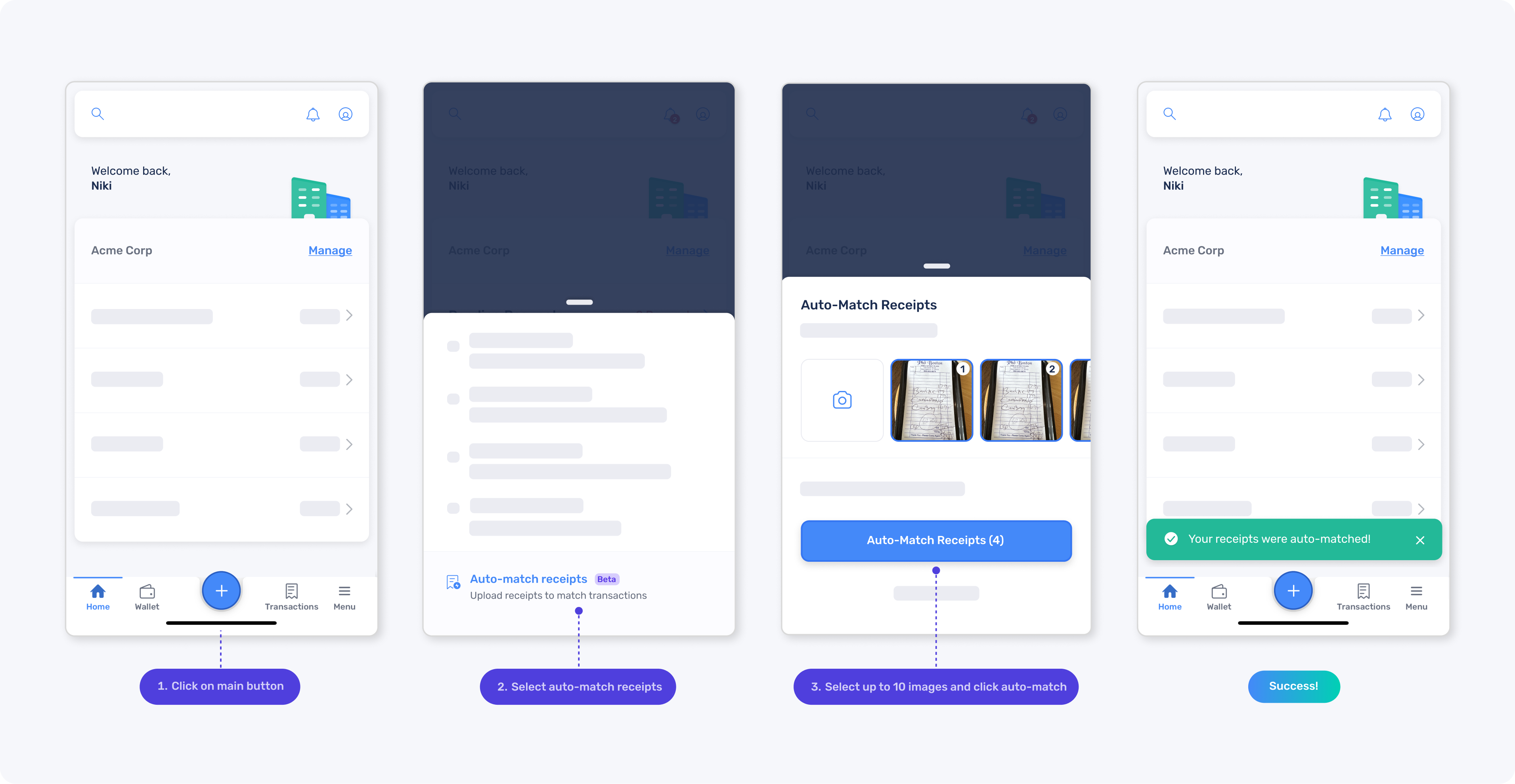
From the Create New menu or the Card Transactions page (on web or mobile), upload up to 10 receipt image(s) or files at a time and voilà… Extend will automatically analyze and match them to the correct transactions.
Auto-matching via SMS (text message):
Reply to Extend’s receipt alerts or send a receipt via SMS to automatically match it to the correct transaction while you’re on the go.
Manual attachment:
From the Transactions tab on the Expenses page, locate the transaction to which you’d like to attach a receipt. Select the transaction and “Add receipt” on the transaction details screen.
Did you know? 🔎 You can easily capture and attach receipts on-the-go with receipt auto-matching. And whether you auto-match or manually upload, Extend automatically verifies every receipt and surfaces a verification status on the transaction.
Send receipt reminders
The Owner, Admins, and Bookkeepers can remind users to attach receipts with in-app reminders. You can send one bulk reminder to everyone with missing receipts or by individual transactions. Users will receive an in app alert, email, and will be able to see which expenses still need a receipt.
To send a receipt reminder, go to the Card Transactions page within the Expenses section, then select “Receipt Reminder” from the Receipt Tools drop-down menu or click the red missing receipt icon in the Transactions list.
Export receipts
All users can export transaction data with attached receipts and notes for any transactions they have access to, based on their role and permissions. With everything already matched, there's no manual reconciliation so you are audit-ready.
From the Card Transactions page within the Expenses section, apply filters as needed and select “Download” to export the data.
Best Practice 🚀
Give your finance team a break from receipt chasing! Set your receipt rules ASAP to help your employees stay compliant.
FAQs
Who can manage receipt rules and reminders?
The Owner and Admins can set and change the receipt rule for their org, as well as, send receipt reminders to all users in their org who are missing required receipts. Bookkeepers can send receipt reminders, but they cannot control the receipt rule.
Where can I view receipt reminders?
Each person will receive an email and an in-app notification with a link to a pre-filtered view of their transactions missing receipts. Even if they have multiple missing receipts, they will only receive one reminder per day.
Can I exclude specific transactions or virtual cards from a receipt rule?
The Owner, Admins and Bookkeeper can click on a cleared transaction and scroll down to the section where they can disable the receipt rule for that specific transaction. They can also turn a receipt rule on/off for individual virtual cards within the card details page.


.png)
.png)


%201.png)


%201.png)
